BI Beat: Let the System Do it: Simplifying the Claimant Portal
The BI Beat is a monthly newsletter column written by the Behavioral Insights team, featuring insights, practical examples and interviews from the field. Provided in partnership with the U.S. Department of Labor.
To support states’ efforts in improving the experience for claimants and for reducing errors, the Behavioral Insights team has compiled an Intervention Idea* to clarify work search and earnings reporting requirements in online claims. The project demonstrates a key philosophy of design: rely on the system to make the process easier.
The Challenge: Cognitive Overload
It goes without saying that when someone is applying for unemployment insurance benefits, they are experiencing a challenging time in their lives. While balancing the tasks they need to complete for their claim, they are worrying about finances, searching job boards, and dealing with all of their day-to-day life stressors.
Learning how to manage a weekly claim is a major cognitive burden. Simplifying the claimant experience can help remove undue friction from an already stressful process, helping to reduce mistakes, misinterpretations, and confusion for claimants.
The Solution: Let the System Do It
This Intervention Idea focuses on two key strategies: utilizing salient (or timely) cues and simplifying the language and how it’s presented. Both of these strategies offload some of the burden of remembering and interpreting requirements from claimants to the system itself. These recommendations follow established behavioral science principles as well as best practices in user experience design (UXD).
Salient Clues
We can spotlight information to the claimants in the form of helpful reminders. We’ve highlighted two methods that have shown impactful results.
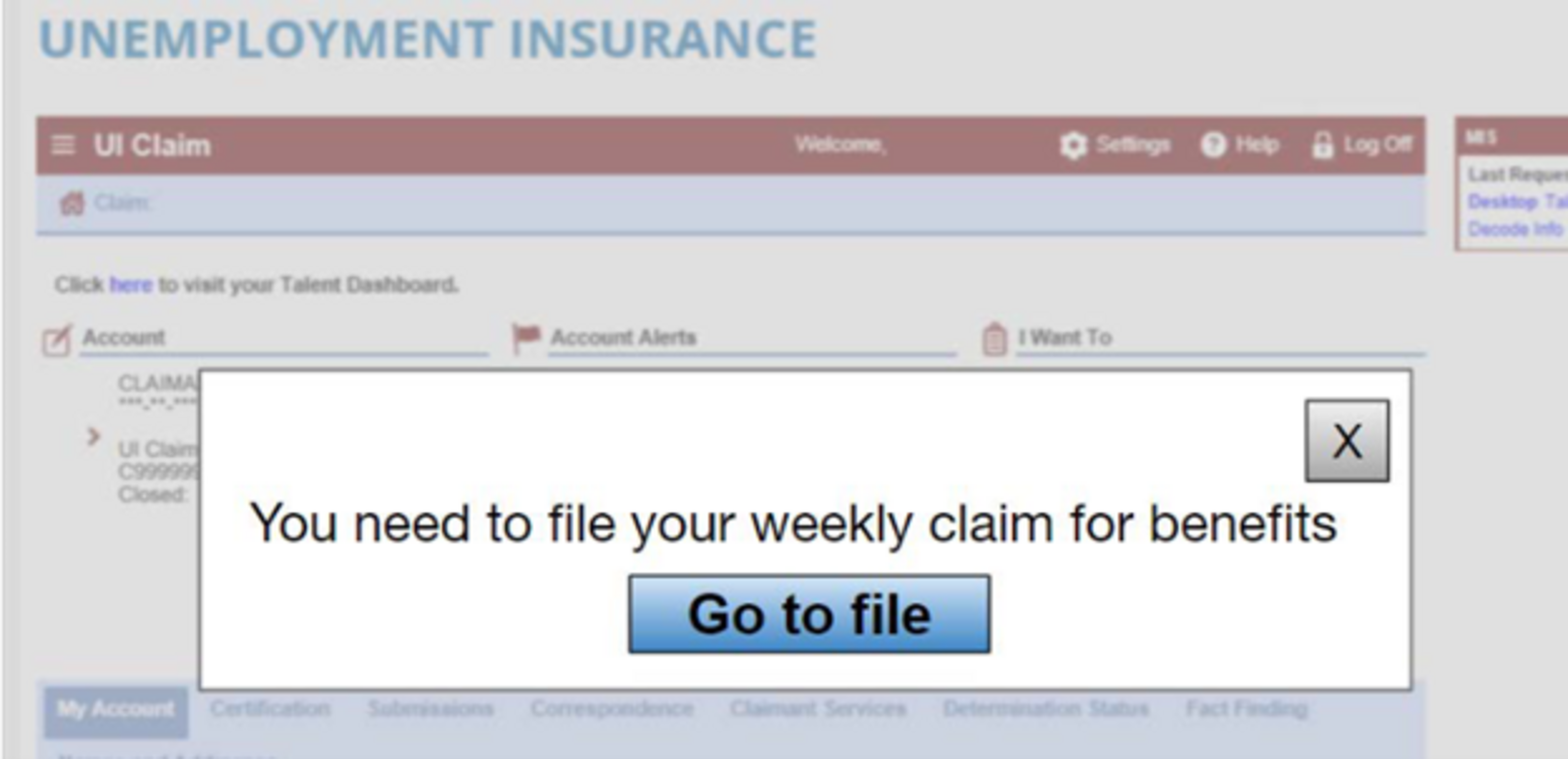
1. Pop-ups
a. Even though claimants certify claims weekly, it is only one of many tasks they need to accomplish in their lives and may be only one of many tasks they even need to accomplish for their UI claim.
b. Pop-ups similar to the one shown below can help highlight the importance and urgency of the task by putting it front and center. It is difficult not to notice something as prominent as this on a webpage.
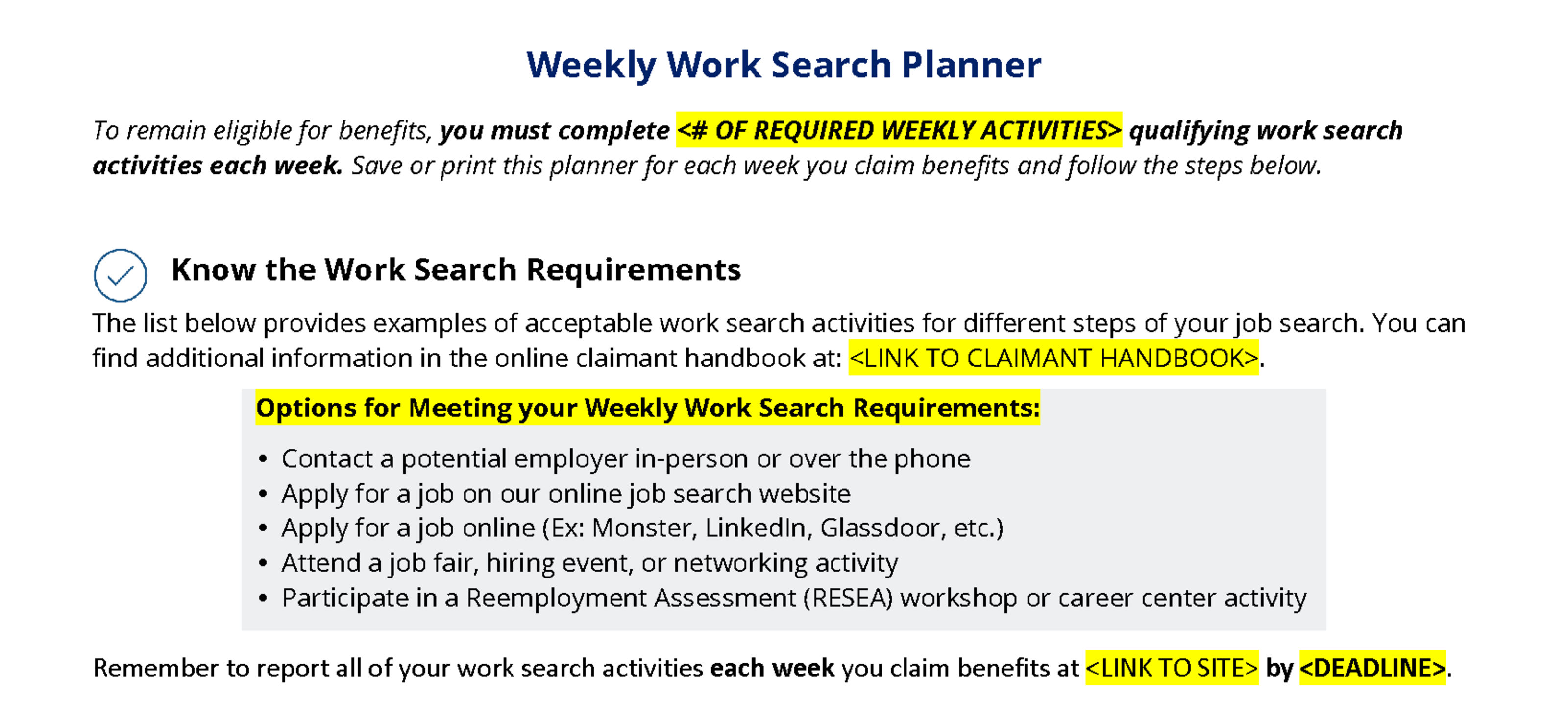
2. Preemptive nudges
a. Encouraging claimants to plan their work searches for the next week acts as a reminder and draws on the behavioral principle of intention and commitment, since making a clear and specific plan increases the likelihood of following through on a task.
b. Including additional reminders on confirmation or summary pages can further cement the task in claimants’ minds.
Simplifying Language and Layout
Microcopy is important. A small amount of text can carry a significant impact when it comes to informing and encouraging users to take specific actions. Simple, strategically placed language stands out and helps claimants focus on the most important information at the time that they need it.
- Consider how claimants would actually think and the words they use. Speaking claimants’ language can help them understand what they need to do without needing to seek out clarification or support. Keeping key information together eliminates additional clicks that claimants need to make to access the information they need to properly complete a task. This can help keep them focused on the task at hand, reducing strain on working memory and the errors they lead to.
- Reduce friction costs, for example, by revising the layout for job contacts included in the online weekly claims form so that claimants can enter all job contact information on one page or by placing direct links to key resources on the weekly claim page itself.
Where to Get Started
A redesign is no easy feat, despite how simple the changes may appear to be. But even simple-looking changes can have a big impact, especially when coupled with additional interventions.
A few tools to focus on might be:
- System data: Reviewing data from your benefits system to find where claimants are making errors, and redesign key areas to fix the biggest sources of error.
- Usability testing: Usability testing helps you understand where claimants are struggling and helps prioritize resources.
- Standard design practices: Claimants' expectations for how online experiences, including online applications and forms, should function are shaped by all the other websites they use. Using design patterns that claimants are already familiar with and best practices mental models makes it easier for claimants to catch on to what they are expected to do and how they are expected to do it.
See our full article in the Library on simplifying the claimant portal for even more details and strategies on how to create experiences that make the weekly claims process easier for claimants to complete accurately and on time.

If you are interested in simplifying the online claimant experience, NASWA BI can help. Reach out to us at integrity@naswa.org to learn more.
*A NASWA member login is required to access some Library resources. Watch this video for help.
Programs provided in partnership with the U.S. Department of Labor.